 飞书多维表格-前端项目搭建
搭建 react 使用 create-react-app 搭建,当然也可以使用 next,但是 next 的弊端有点大,比如 next 不支持隐式的路由参数,只支持显式的。
这里不适用 Vite,是因为 Vite 的生态不是很好
进入 create-react-app 官网 (opens new window)
# 创建 react 项目
pnpm create react-app my-react
项目文件描述:
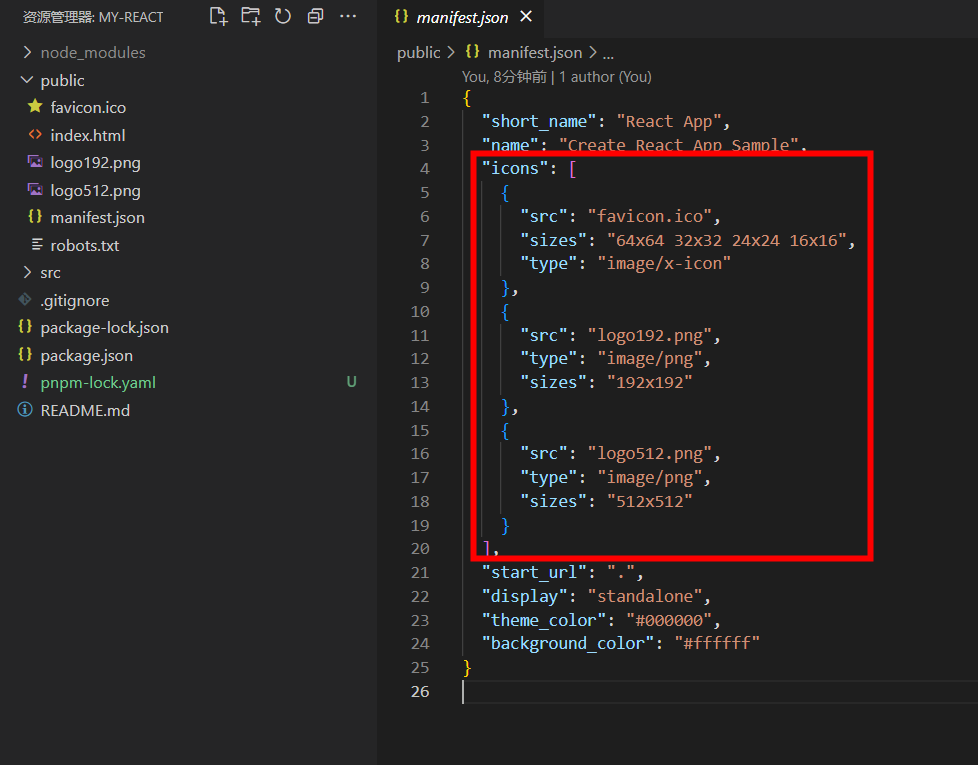
public/manifest.json:存放一些静态资源的描述,浏览器有一个自动缓存的策略,就是说,所有的静态资源都会被浏览器进行缓存,手动在配置这些缓存数据
reportWebvitals.js:网页性能监控,判断网页性能的标准 FCP(first contentful paint),首个模块渲染处理所花的时间、FLP 页面最大的模块渲染出来所占用的时间
性能优化不是说莽着头去进行,而是根据具体的数据,首屏打开多少秒,fcp 多少,flp 多少。
这个项目不需要单元测试,不需要性能监控,因此将setupTests.js、reportWebVitals.js删掉
# 引入 TS
yarn add -D typescript @types/node @types/react @types/react-dom
typescript一般将逻辑代码和类型分离开,类型使用单独的@type包
# 解决 tsx 报错
设置 ts 的模块解析方式,在项目根目录下新建文件tsconfig.json,新建文件后,报错立马少了部分,是因为 ts 是和 es 模块结合最好,当项目存在了tsconfig.json文件后,会给一些默认配置
{
    "compilerOptions": {
        "jsx": "react-jsx"
    }
}
2
3
4
5
找不到模块或者类型声明
- 检查文件到底存不存在
- 写类型声明
三斜线指令:代表项目中所要用到的所有类型声明
- 根目录新建
create-app-env.d.ts,写入/// <reference types="react-scripts" /> - 安装
react-scripts:pnpm add -D react-scripts
- 根目录新建
# 给项目注入环境变量、给 window 挂属性
我们不能直接往 window 上挂属性,比如window.a = 'hello',如果要往 window 上面挂类型声明,需要在create-app-env.d.ts文件中声明:
/// <reference types="react-scripts" />

interface Window {
    a: string
}

declare namespace NodeJS {
    interface ProcessEnv {
        PORT: number
    }
}
2
3
4
5
6
7
8
9
10
11
# 跳过第三方库的类型检查
{
    "compilerOptions":{
        ...
        "skipLibCheck": true
    }
}
2
3
4
5
6
# yarn eject 反编译,将 react 的所有配置都展示出来
反编译将react-scripts包给抹除掉了,重新安装即可
# 给项目植入路由
pnpm add -D react-router-dom
在 src 目录新建配置文件,router.config.tsx,使用 tsx 是为了在路由对象中直接使用引入的 tsx 组件
import { createBrowserRouter } from 'react-router-dom'
import Home from './pages/Home'
import Login from './pages/Login'

const routes = createBrowserRouter([
    {
        path: '/',
        element: <Home />
    },
    {
        path: '/login',
        element: <Login />
    }
])

export default routes
2
3
4
5
6
7
8
9
10
11
12
13
14
15
16
# 添加路由守卫
没有登录的用户直接跳转到 login 页面
react 里面是没有 beforeRoute 的
路由的本质: 通过条件判断 url,是否匹配上对应的路由,从而进行元素的显示与隐藏
if (matched) return <Home />
return null
2
要实现路由守卫,采用一个根路由,在根路由里面进行路由守卫判断
新建根路由,src 目录下新建文件 RouterGuard.tsx:
import { useEffect } from 'react'
import { useNavigate, Outlet } from 'react-router-dom'

export default function RouteGuard() {
    // 根路由
    // navigate是导航的
    const navigate = useNavigate()

    useEffect(() => {
        // 在这个useEffect里,我们需要判断当前用户有没有登录
        const isLogin = false
        if (!isLogin) {
            navigate('/login')
        }
    }, [])

    return (
        // Outlet相当于router-view
        <Outlet />
    )
}
2
3
4
5
6
7
8
9
10
11
12
13
14
15
16
17
18
19
20
21
在路由配置文件里面进行配置:
{
        path: '/',
        element: <RouteGuard/>,
        children:[
            {
                path: '/',
                element: <Home />
            },
            {
                path: '/login',
                element: <Login />
            }
        ]
    }
2
3
4
5
6
7
8
9
10
11
12
13
14
useRoutes 在 vue 中是得到路由元数据。在 react 中,用来替代<RouterProvider router={router} />,使用函数式返回 jsx:
import * as React from 'react'
import { useRoutes } from 'react-router-dom'

function App() {
    let element = useRoutes([
        {
            path: '/',
            element: <Dashboard />,
            children: [
                {
                    path: 'messages',
                    element: <DashboardMessages />
                },
                { path: 'tasks', element: <DashboardTasks /> }
            ]
        },
        { path: 'team', element: <AboutPage /> }
    ])

    return element
}
2
3
4
5
6
7
8
9
10
11
12
13
14
15
16
17
18
19
20
21
# 惰性路由
比如,我们只进入登录页,会发现 Home 页面也被加载了,这不是我们期望的。我们希望到了 Home 页面再加载。
使用 lazy
import { lazy } from 'react'

const Home = lazy(() => import('./pages/Home/index'))
2
3